We remain fully operational. Our teams are working around the clock to ensure your deliveries continue safely.

DOWNLOAD THE APP


Copyright © 2025 Desertcart Holdings Limited
DOWNLOAD THE APP
Buy anything from 5,000+ international stores. One checkout price. No surprise fees. Join 2M+ shoppers on Desertcart.
Desertcart purchases this item on your behalf and handles shipping, customs, and support to KUWAIT.
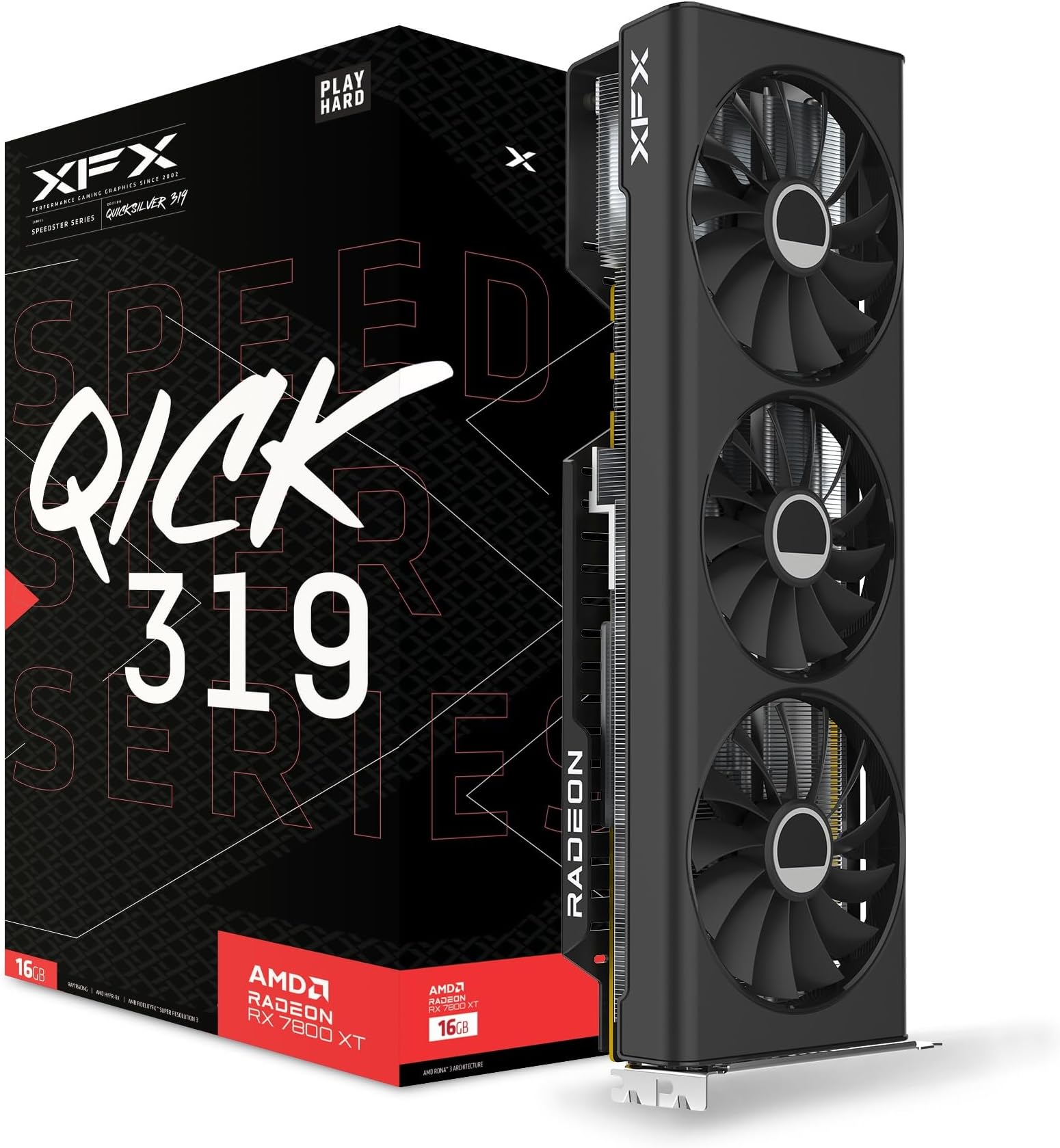
🔥 Power Your Play with the XFX Speedster QICK319!
The XFX Speedster QICK319 RX 7800 XT CORE is a high-performance gaming graphics card featuring AMD's cutting-edge RDNA 3 architecture, 16GB of GDDR6 memory, and a boost clock up to 2430 MHz. Its robust triple-fan cooling system ensures quiet, efficient heat management, while support for 4K resolution and multiple display outputs makes it ideal for immersive, professional-grade gaming setups. Perfect for millennials seeking a powerful yet affordable upgrade that balances performance, cooling, and future-ready features.


| ASIN | B0CGM92TW8 |
| Best Sellers Rank | #149 in Computer Graphics Cards |
| Brand | XFX |
| Built-In Media | Graphics Card |
| Compatible Devices | Desktop |
| Customer Reviews | 4.6 out of 5 stars 630 Reviews |
| Display Maximum Resolution | 3840 x 2160 |
| Display Resolution Maximum | 3840x2160 |
| Global Trade Identification Number | 00840191502477 |
| Graphics Card Interface | PCI-Express x16 |
| Graphics Card Ram | 16 GB |
| Graphics Coprocessor | AMD Radeon RX 7800 XT |
| Graphics Description | AMD Radeon RX 7800 XT with 16 GB GDDR6 memory, boost clock up to 2430 MHz, and PCI-E 4.0 interface |
| Graphics Processor Manufacturer | AMD |
| Graphics RAM Type | GDDR6 |
| Graphics Ram Size | 16 GB |
| Graphics Ram Type | GDDR6 |
| Item Dimensions L x W | 13.2"L x 2"W |
| Item Weight | 1 Kilograms |
| Manufacturer | XFX |
| Memory Clock Speed | 19.5 GHz |
| Mfr Part Number | RX-78TQICKF9 |
| Model Name | RX-78TQICKF9 |
| Model Number | RX-78TQICKF9 |
| Number of Fans | 3 |
| UPC | 840191502477 |
| Video Output Interface | HDMI |
| Video Processor | AMD |
| Warranty Description | 3 year manufacturer |
J**S
Big step up from a 1070 - VR and installation tips
It seems like there are very few written reviews for the 7000 series GPUs. Maybe that's normal for AMD. Either way, I want to share some info to make sure others have a smooth experience. I came over from the green team, specifically, an EVGA GTX 1070 SC. That card is getting long in the tooth, doesn't have a lot of the more modern features, and definitely struggled with newer AAA games. Getting right to it, this XFX 7800XT has been doing a great job. I tried Hogwarts Legacy on ultra with raytracing. That was stuttery, so I played around and could get pretty solid performance on high settings. I disabled ray tracing expecting much worse visuals. Honestly, I think RT is overhyped. I'll take all ultra settings with no ray tracing and smooth performance any day. Maybe RT is poorly implemented on Hogwarts? I didn't expect to see things like hanging spoon shadows in shops rendered well, but they were there without RT. The card itself has stayed cool and quiet. I haven't noticed it being any louder the the 1070 it replaced. I promised tips, and I feel these are very important. If you're swapping from nvidia, it's recommended to use DDU - Display Driver Uninstaller. I'll assume you're a Windows user for these tips. -First, make sure to check Windows Update for any system updates. Give the computer a reboot to make sure everything is installed and working before doing driver surgery. -Download DDU (it's free) and the AMD drivers. -Click Start, click the power icon, then hold shift while clicking reboot --> advanced options. Most tutorials show a blue screen with options right after clicking reboot. That must have changed recently because my safe mode options were the first thing I saw after it rebooted. -The goal is to reboot into safe mode *without networking*. -Run DDU to nuke all remnants of nvidia drivers. Make sure to tick the box that will reboot after its done. Windows will reboot, using a generic video driver. -Install the AMD drivers/Adrenaline software -Careful running Windows updates - Microsoft seems to think it knows best and installed a driver over the one I just installed, causing Adrenaline to be missing update buttons. If this happens, open device manager, double click the AMD display driver, go to the Driver tab, roll back driver. Your update buttons in Adrenaline should be back. VR tips (assuming Oculus 2 using AirLink) -Firstly, you may want to just use Virtual Desktop Streamer. In some (probably most) cases it's better than Air Link. I read that Virtual Desktop keeps GPU power draw up when not in use, so you might want to close that when done. -For Air Link, I experienced weird warping or distortion. The Oculus Debug tool can fix this (or did for me). Even with these steps, the Oculus software will complain that you're using an unsupported GPU - ignore the warning. -Find the Oculus Debug Tool - by default it is in C:\Program Files\Oculus\Support\oculus-diagnostics -Someone on reddit said warping had something to do with needing an Encode Resolution Width that is a multiple of 64. The value they cited (and I used) is 3712. -While you're in the debug tool, set video codec to H.265 - this helped with color banding in Beat Saber. -Click into another field in the debug tool for the tool to save what you entered. If you just enter the text and close, it won't save. TADA! You should be up and running! I've only had the card for a week or so, but after getting these things ironed out in day one, it's not been a problem at all. Even streaming to my Steam Deck in the living room via Moonlight/Sunshine has been 100% fine. I don't usually write reviews, but I'm rooting for AMD (even if they're *still* a bit over priced). I also hope these troubleshooting steps being in one place might help another person. If I notice anything horrible with the experience in the coming months, I'll post an update.
G**I
Great price to performance when I bought it.
Picked this card up a few months ago when it was hangin around the 500 dollar mark. This card is HUGE, however, it cools REALLY well. I've never seen this card go above 54 degrees Celsius. I had a MSI 6650XT before this, it was idling at around 50C and usually peaked around 67-70C. This card idles at 36C with the fans at 30%. I've never had any issues running any games with this card, performs really well for the price. The drivers never gave me any issues either. Just played the battlefield 6 beta and was getting 90-100 fps consistently on ultra settings. My only gripe about it is that the fans can get extremely loud, at 60%+ fan speed this thing sounds like a Hornet ready to take off the deck of a carrier. Thankfully, I'm not very picky when it comes to fan noise since my music or game is usually louder and drowns out the fan noise. It's also important to note that my PC is literally a foot and a half away from my head. If you have noise cancelling headphones, disregard this entire paragraph, you can't hear the pc anyway.
C**H
Like promised.
Installed this without a hitch in installation. Do her site to check the specs, because I also had to order a higher powered CPU, Otherwise you will not be able to run this graphics card. Works like promised.
T**G
Solid improvement over Radeon 6700
I built a gaming pc for my son’s birthday 2 years ago and being the height of Covid bitcoin mining ended up having to spend nearly 1000 bucks on the Radeon 6700 graphics card. At the time it was a middle of the road card and was WAY overpriced for what you got. Well things have calmed down in the graphics card market since then and I wanted to get a nice upgrade for his computer without spending another band to do so. I chose this Radeon 7800 which is also not top of the line but seemed to offer reasonable frame rate increases as well as having 4gb more ram on card. I installed the card this weekend and noticed a few things right off the bat: 1) the card is quieter 2) the picture quality on most games/webpagesetc is vastly improved with much better contrast and black/dark colors standing out much better 3) frame rates are better but not as much as expected. 4) the card uses less power than the 6700 So while this is not the top of the line card and did not quite push as many pixels as expected it is a great upgrade especially for around 450 bucks. The card itself is slightly larger than the 6700 and barely fit in my son’s full size gaming tower case so smaller cases may not fit this card. It is built well and has a nice sturdy heat sink and is finished in a nice anodized black color.
S**S
Best 1440p card for the price
Best 1440p card for the price. Running the card for about 6 months no issues. Getting 300 fps consistent on Siege with high graphics, 80 fps on KCD2 on ultra 1440p, 90 fps on Cyberpunk on 1440p ultra graphics(no ray tracing). Would buy XFX again.
J**N
Great 1440p card but with one glaring omission
This is a great card. I was upgrading from a 2080 Super because it was getting a bit long in the tooth for some newer games at 1440p with max settings. I didn't want to spend a ton of money on a new card, and I have no desire to do 4k or turn on ray tracing, so this works well. It has given me 60-100 fps with all of the recent titles I've played. The ONE THING though, and the reason I took off a star is that this doesn't have a USB-C input. Even my 2080 Super that came out in 2019 has one. Most people probably wouldn't care about the port, but I used it to hook up my second small portable monitor up. That way I only had one thin cord running instead of now an HDMI to the card and the power supply to the floor. Other than that though, if you are doing 1440p gaming this is a reasonably priced card which will perform well.
D**H
Great Customer Service
Had a small problem with a video card. Contacted Customer Service and was very pleased with the quick response. They went out of the way to make things right. Very good merchant - wold recommend them to anyone. Video card functions as expected.
M**Y
Be weary
Took a year and a half to kill this gpu. Games almost all completely unplayable, just moving the mouse across my screen is tearing the thing to shreds. Started the journey with amd had more fun when I was running with nvidia don’t know why I decided to go back to red especially with xfx. Dissapointed.
Trustpilot
2 weeks ago
2 months ago